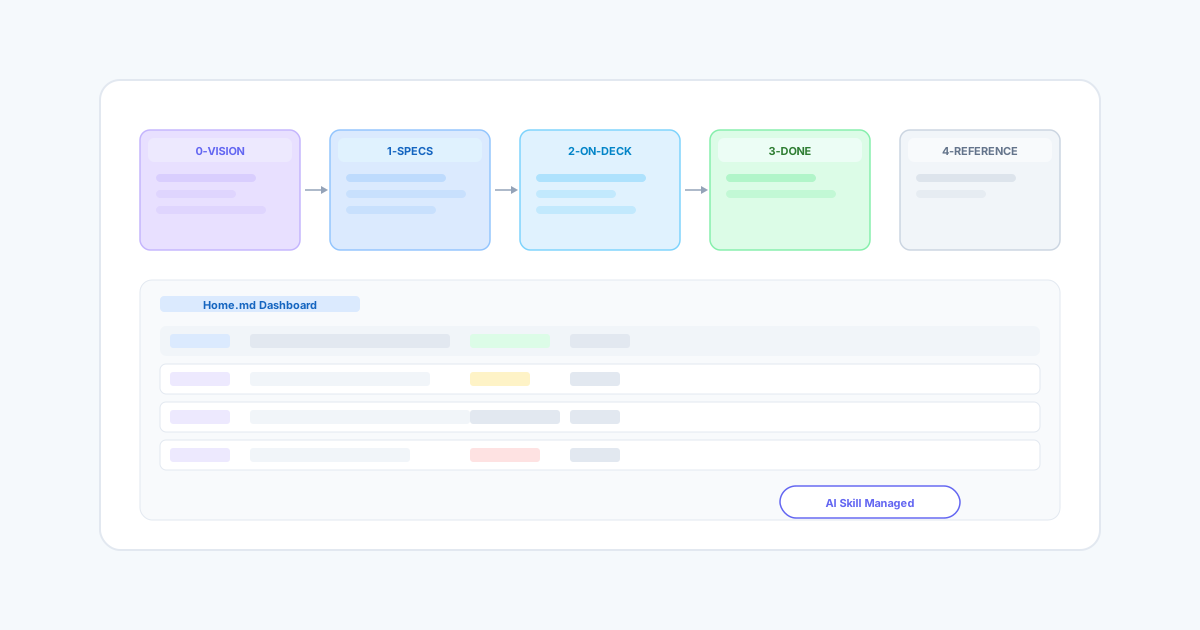
Part of the Inner Agility thesis. This post demonstrates the pipeline-as-connective-tissue pattern — five numbered directories became a navigable, AI-managed lifecycle. Read the thesis →
Every complex project has a documentation graveyard. Session recaps pile up next to formal specs. Claude Code prompts sit beside Excalidraw sketches. Completed work blends into active plans until opening the project folder feels like archaeology. We hit that wall with JE-PFM — 30 files scattered across 7 directories with no way to know what was active, what was done, or what should happen next.
So we built a pipeline. Not a CI/CD pipeline for code, but a document lifecycle pipeline for the thinking that drives the code. And then we taught our AI assistant how to manage it.
The Problem with Flat Documentation
Our Obsidian vault had accumulated organically over months of development. A session recap from March 17 sat next to the JE-PFM requirements spec. A file called bubbly-splashing-deer.md turned out to be an exact duplicate of a plan that already existed under a different name. An empty file titled TODO - Definition of Done).md contained exactly one line: "PFM-Research Definition of Done" — and nothing else.
The real cost was not the clutter. It was the startup tax on every new work session. Whether working with Claude Code, Cursor, or just opening the vault in Obsidian, the first 15 minutes of any session were spent figuring out what was relevant, what was stale, and what should be ignored. That context-loading cost compounds quickly when you work in short, focused sessions.
Five Numbered Directories
The solution was embarrassingly simple. We reorganized the entire vault into five numbered directories, each representing a stage in the document lifecycle.
0-vision/ holds the "why" — north star documents, Excalidraw drawings, and early ideation that describes where the project is heading. These are living documents that evolve but never really get "done." The pencil workflow vision, the iCashflow data model, and our visual thinking artifacts all live here.
1-specs/ contains the "what" — formal requirements that have been refined enough to act on. The JE-PFM specification with its 63 use cases, the SaaS integration spec describing how our two repos connect, and the package consumption guide all live here. Moving a document from 0-vision/ to 1-specs/ is a deliberate act that says "this idea is now concrete enough to build from."
2-on-deck/ is the "now" — active work. Our POC execution plan, the component catalog, and any task we are currently building lives here. This directory answers the question "what should I be working on?" at a glance. If it is not in 2-on-deck/, it is not active.
3-done/ is exactly what it sounds like. When a POC validates, when a plan gets executed, when a session produces a recap — the output moves here with a date prefix. An archive/ subdirectory catches historical snapshots and superseded documents. Nothing gets deleted — it just moves down the pipeline.
4-reference/ holds permanent tools — reusable Claude Code prompts for GitHub Actions audits and PR consolidation, MCP server configurations, and a pipeline guide that any AI assistant can read to understand how the vault works.
The numbers are the pipeline. 0 through 4. A document starts as a vision, gets formalized into a spec, becomes active work, gets completed, and leaves behind reference material. The order is always forward.
A Dashboard That Shows Everything at Once
At the vault root, Home.md serves as the dashboard. It shows the current phase (Finish JE-PFM → Build iCashflow → Pencil Workflow), a status table of active POCs with their completion status and estimated timelines, and a vault map linking to every document in the pipeline. Opening the vault in Obsidian means clicking one file and seeing the entire project state.
The dashboard uses Obsidian wiki-links, so every entry is a clickable link to the underlying document. The POC table shows which proofs of concept are not started, which have drafts done, and which are blocked by dependencies. If someone joins the project or an AI assistant needs context, the dashboard is the single entry point.
Teaching Claude to Manage the Pipeline
This is where it gets interesting. We created a Claude Code skill — a structured document that teaches Claude how to operate the pipeline. The skill lives at .claude/skills/pipeline-manager/SKILL.md and triggers automatically when you say things like "where are we?", "what's on deck?", "mark X as done", or "capture this session."
The skill defines five operations.
STATUS scans the vault and produces a structured report: what is active in 2-on-deck/, what is next based on the POC sequencing, what is blocked by dependencies, and what looks stale (files untouched for more than two weeks). Starting a Claude Code session with "where are we?" gives you full situational awareness before typing a single line of code.
ADVANCE moves documents between stages. When a POC validates, you say "mark the scope toggle as done" and the skill moves the file from 2-on-deck/ to 3-done/ with a date prefix, then regenerates the dashboard automatically. It knows which transitions are valid — you cannot skip stages, and it will ask for confirmation before moving anything.
CAPTURE takes session output and files it into the correct stage. If you have been working through a complex problem and produced a new specification, you say "capture this as a spec" and the skill writes it to 1-specs/ with the appropriate naming convention. Session recaps go to 3-done/archive/. New ideas go to 0-vision/. Reusable prompts go to 4-reference/prompts/.
REGENERATE rebuilds the dashboard from scratch by scanning all pipeline directories. It runs automatically after ADVANCE and CAPTURE, but you can also trigger it manually if you have reorganized files by hand.
CLEAN identifies problems — documents stuck in 2-on-deck/ for too long, empty directories, or items that should have been archived. It is the maintenance operation that prevents the vault from drifting back toward the chaos it started in.
Visual Thinking as a Pipeline Input
One of the motivations for this system was making Excalidraw drawings — the visual thinking artifacts we create in Obsidian — into first-class inputs for the development process. Excalidraw files are stored as .excalidraw.md files, which are actually markdown documents with embedded JSON data. This means AI assistants with filesystem access can read them, extract the text elements and structural relationships, and interpret what the drawing is communicating.
In our case, an Excalidraw drawing titled "Ideation for Next POC Cluster" contained sketches of a conversational UI creation flow — a red pencil icon that opens an AI chat session, where users describe what they want and the system presents matching components from the existing catalog. That drawing, once read and interpreted by Claude, became a concrete POC execution plan with four sequenced proof-of-concept projects, implementation steps, and success criteria. The vision in 0-vision/Excalidraw/ directly produced the active work in 2-on-deck/.
This is the pipeline working as designed. A visual sketch enters at stage 0. Claude reads it, interprets the vision, and produces a formalized plan. That plan moves to stage 2 as active work. When the POCs complete, they move to stage 3. The Excalidraw drawing stays in 0-vision/ as the original creative artifact — unchanged, but now connected to everything it produced downstream.
What We Actually Learned
The pipeline itself is not technically sophisticated. It is five directories with numbers in front of them. The power comes from three things working together.
First, the numbering creates an unambiguous ordering. There is no debate about whether a document belongs in "planning" or "specs" or "ideas." It belongs in the stage that matches where the work actually is. When the work advances, the document moves forward. The physical act of moving a file between directories makes the progression visible and intentional.
Second, the AI skill turns pipeline management from a manual chore into a conversational interaction. You do not open a file manager, drag files between folders, and edit a dashboard. You say "mark the scope toggle as done" and the system handles the mechanics. This matters because pipeline maintenance is the kind of housekeeping that gets skipped under time pressure — and skipping it is exactly how you end up with a 30-file documentation graveyard again.
Third, having a reference guide in the vault itself means the pipeline is self-documenting. Any AI assistant — whether it is Claude Code with the full skill loaded, Claude.ai with filesystem access, or a completely different tool — can read 4-reference/pipeline-guide.md and understand how to work with the pipeline. The system does not depend on any single tool or configuration. It is just files and folders with a documented convention.
If your project documentation has drifted from useful reference into accumulated sediment, consider whether the problem is the documents themselves or the lack of a lifecycle. Documents are not static artifacts. They have a natural progression from idea to spec to active work to completion. Making that progression explicit — even with something as simple as numbered directories — changes documentation from something you maintain into something that maintains itself.
The full pipeline structure and the Claude skill are in our pfm-platform repo under docs/pfm-platform/ and .claude/skills/pipeline-manager/.