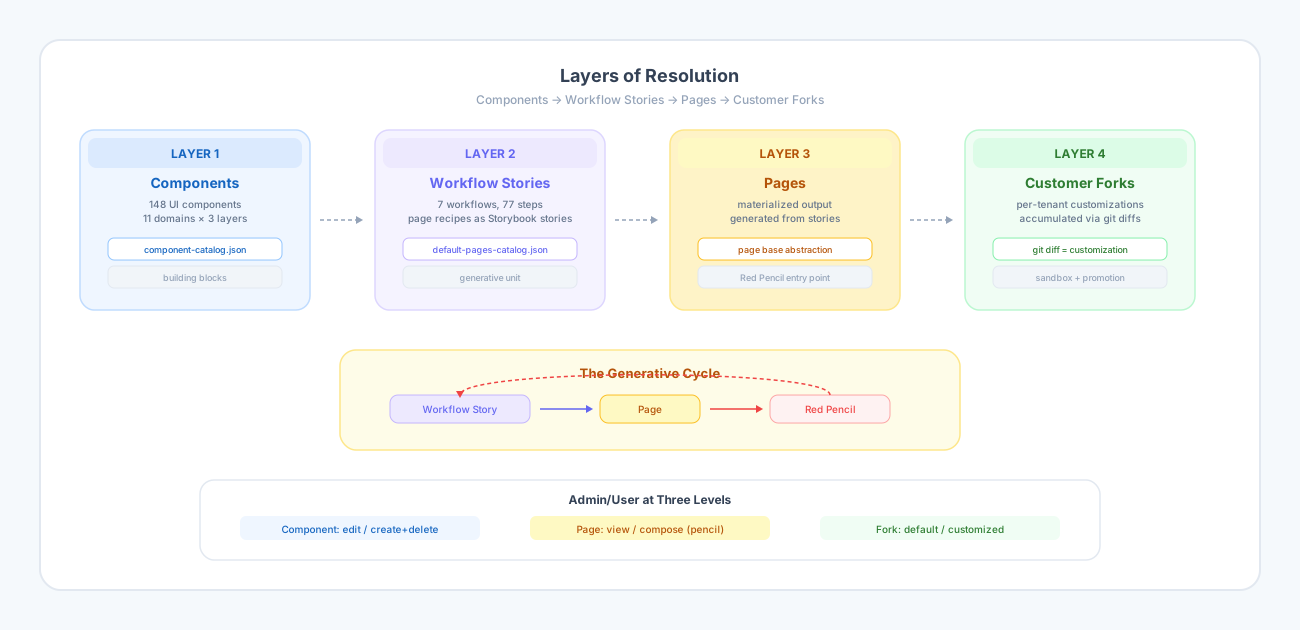
Part of the Inner Agility thesis. This is the core architectural thesis. Components, Workflow Stories, Pages, and Customer Forks — each connected by machine-readable artifacts. Read the thesis →
In our roadmap post, we described three phases: finish the platform, build a cashflow engine, and create a system where users speak features into existence. That was the plan. Then we tried to test an Admin/User toggle, and the plan got sharper.
The toggle was supposed to be simple. In Admin mode, you see full CRUD controls. In User mode, you see view-and-edit only. The component-demo app had this working. When we built the same toggle into je-pfm-oneshot, our production proof-of-concept, we got it wrong. We hid edit buttons that should have been visible. The heading said "User Mode" but nothing actually changed about the page underneath.
The bug itself was trivial. But the question it raised was not: what does Admin/User actually mean when you have components, pages, AND per-customer forks that all need different admin surfaces?
Components Are Not Enough
We had built a component catalog with 148 UI components across 11 financial domains. Each component is individually tested, published as an npm package, and described in a machine-readable JSON file that an AI can consume. This is the vocabulary for building pages.
But a vocabulary is not a sentence. Knowing that "BudgetList" and "BudgetEditForm" and "BudgetInsightsCard" exist does not tell you how they compose into a page, in what order, or as part of what user journey. We had building blocks but no recipes.
Workflow Stories Are the Missing Layer
The recipes already existed. We had seven Storybook workflow journeys — First-Time Onboarding, Daily Check-In, Monthly Review, Import Cycle, Account Management, Tag Housekeeping, and the full iCashflow suite — with 77 steps between them. Each step mapped to a use case, a component, and a page route.
What we had not done was treat these workflows as a formal artifact the way we treated the component catalog. Once we did, the architecture clicked into place.
We now think about the system in four layers of resolution:
Layer 1: Components — the 148 building blocks. Connective tissue: component-catalog.json.
Layer 2: Workflow Stories — the page recipes. Each story defines a sequence of components, their props, their layout, and the user journey. Connective tissue: default-pages-catalog.json.
Layer 3: Pages — the materialized output. Each page is generated from a workflow story and knows its origin.
Layer 4: Customer Forks — accumulated customizations per tenant. The git diff between a customer's fork and the default IS the customization record.
The Generative Cycle
The system is bidirectional. Workflow stories generate pages. But pages also generate new workflow stories.
This is the Red Pencil vision from Phase 3 of our roadmap, but now with concrete architecture behind it. A business analyst opens the Budgets page in Admin mode. A pencil icon appears. They click it. An AI chat opens with the page's workflow story and the component catalog as context. The analyst says "add a budget visualization chart above the budget list." The AI generates a new workflow story. The story materializes as a modified page. The page is saved to the customer's fork.
The analyst never knows they created a use case. They described what they wanted and the system materialized it.
Admin/User at Three Levels
This is what the toggle bug taught us. Admin/User is not one thing. It operates at three different levels:
Component level (built): Controls which components show create/delete/edit. Editing your own data is a User capability. Admin adds test data creation and deletion.
Page level (next): User mode renders the page. Admin mode renders the page plus a composition overlay — the Red Pencil entry point. The page knows its workflow story origin and can be recomposed.
Fork level (future): Which customer gets which page variants. Platform architects manage variations across forks.
The component-demo already had the first level right. What we were missing — and what the toggle bug exposed — was that we needed the page-level abstraction before the Red Pencil could work.
What We Built This Week
We consolidated scattered vision documents into a single authoritative architecture document. We created a default-pages catalog that maps all 77 workflow steps to their pages, components, and use cases. We moved iCashflow's data model specifications out of the vision directory and into the specs directory where they belong. We fixed the Admin/User toggle to match the component-demo's behavior. And we added the Imports domain as the 11th domain to the component demo, closing a gap that had been quietly hiding since the beginning.
The pipeline is cleaner now. Vision says why. Specs say what. Active work says how. Each stage has its own artifacts and its own level of resolution.
What Comes Next
The default-pages catalog is the connective tissue that makes the AI chat prototype (our next POC) concrete. The AI does not need to generate code from scratch. It selects from a known vocabulary of components and arranges them according to workflow patterns that are already defined. The catalog is the constraint that makes this tractable.
After that: the page base abstraction — the standard container that knows its own recipe and can serialize its composition back into a workflow story. That is the round-trip that closes the generative cycle.
We are still in Phase 1. But the architecture for Phase 3 is getting clearer with every bug we fix.